
The short answer: the Fishbowl desktop client is the traditional, installed version of Fishbowl that lives on a specific computer, while a web client (like LilyPad’s Nexus) runs in your browser, works from any device, and can layer on features the desktop version doesn’t have — like an AI assistant that drafts purchase orders for you. Neither one is “wrong.” They’re just built for different moments in your workday.
If you’ve ever tried to check on-hand quantities from your phone while standing in a Costco parking lot, you already know why this question matters. Let’s break down what’s actually different, and how to figure out which one your team needs.
What Is the Fishbowl Desktop Client?
The desktop client is the OG. It’s the version of Fishbowl most long-time users know: a program you install on a desktop machine, connect to your database, and open every morning like clocking in. It’s stable, it’s full-featured, and if you’ve been running Fishbowl for years, it’s probably muscle memory at this point.
The catch is right there in the name: desktop. It lives on that machine. Want to check inventory from the warehouse floor, a supplier’s office, or your kitchen table at 9pm because a shipment just went sideways? You’re either remoting into that computer or you’re out of luck.
What Is a Fishbowl Web Client?
A web client does the same core job, reading and writing to your Fishbowl database, but it runs through a browser instead of an installed program. No install, no single machine tying you down, no “sorry, I have to be at my desk for that.”
This is where LilyPad’s Nexus comes in. Nexus is a modern web client built specifically for Fishbowl, and it doesn’t stop at “desktop, but in a browser.” It adds an AI assistant that can draft purchase orders and sales orders on request, read documents like invoices or packing lists and turn them into line items automatically, and build custom reports across your ERP data without anyone writing a line of SQL.
Think of it less as a replacement for Fishbowl and more as a faster front door to it.
The Core Differences, Side by Side
Here’s the practical breakdown:
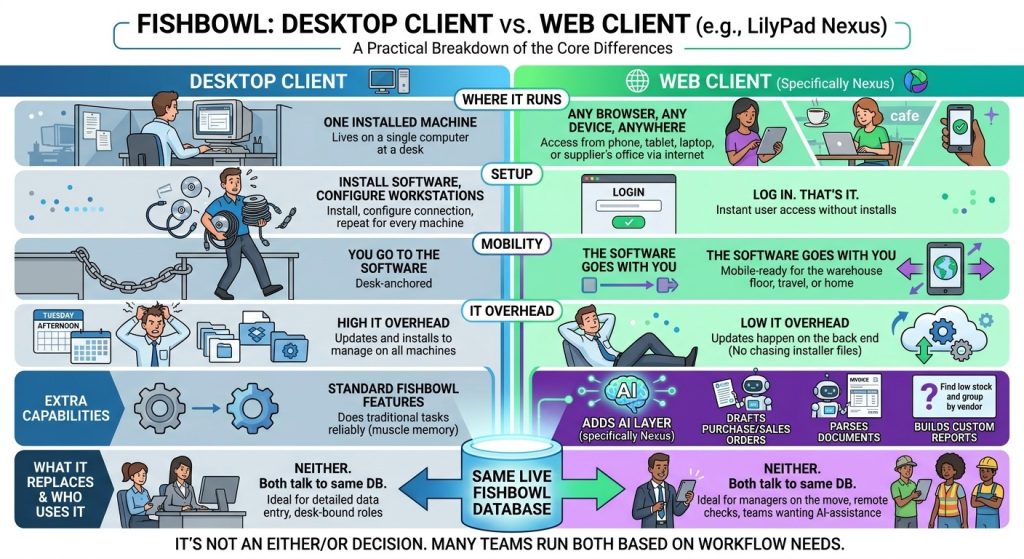
A Quick Hypothetical: The Reorder That Almost Got Missed
Picture a mid-sized distributor — we’ll call it a fairly typical warehouse operation, nothing fancy — where the ops manager splits time between the office and the floor. Every Monday, they need to check which SKUs have dipped below safety stock and get purchase orders out to the right vendors before the week gets away from them.
On desktop-only Fishbowl, that means sitting down at a specific computer, running through the low-stock report, cross-referencing vendors, and building POs one at a time. Doable, but it eats a chunk of the morning, and if that manager gets pulled onto the floor for a receiving issue, the reorder waits until they’re back at their desk.
With a web client like Nexus, that same manager could pull up the assistant from a tablet on the floor, ask it to find everything below safety stock and group it by vendor, and get draft POs back in seconds — ready to review and approve instead of build from scratch. The Monday morning scramble turns into a five-minute check-in between other tasks. Same database, same Fishbowl, just a different way of getting to the work.

Do You Have to Choose One or the Other?
Not really. A lot of teams run both. The desktop client stays put for whoever’s anchored to a workstation and deep in detailed data entry all day. The web client covers everyone else — the manager bouncing between the office and the floor, the person who needs to check something from home, the team that wants AI doing the first draft of a report instead of a human doing it from scratch.
They’re pulling from the same live data, so there’s no syncing delay or “wait, which version is correct” moment. It’s not an either/or decision so much as a “who needs what, when” decision.
Which One Should You Actually Use?
A rough rule of thumb: if your work happens at one desk, on one screen, all day, the desktop client will feel completely normal and you may not need to change a thing. If your work happens anywhere but that desk — the warehouse floor, a supplier meeting, your phone during a delivery delay — a web client is going to save you a genuinely annoying amount of walking back and forth.
And if you’re already thinking, “I wish I could just ask something that’s low on stock instead of digging through a report,” that’s precisely the gap Nexus was built to close.
FAQ
Is the Fishbowl web client the same as Fishbowl Drive?
No. Fishbowl Drive is Fishbowl’s own cloud-hosted product line. A web client like Nexus is a separate tool built to work with your existing Fishbowl database, whether you’re on Fishbowl Advanced or Drive — it’s not a different ERP, just a different way in.
Do I have to switch my whole team to a web client at once?
No — most teams roll it out gradually, keeping desktop access for anyone who prefers it while giving mobile or floor-based staff web access first.
Does a web client require replacing our current Fishbowl setup?
No. It connects to the Fishbowl database you already have. Nothing about your existing setup needs to be ripped out or migrated.
Can I use a web client on a phone, or does it need a tablet or laptop?
It runs in a browser, so it works on a phone, tablet, or laptop — though for anything involving a lot of typing (like building detailed reports), a bigger screen is obviously easier on the thumbs.
Is an AI assistant inside a web client actually reliable for something like drafting POs?
It drafts based on your live Fishbowl data and presents the draft for review before anything is finalized — so you’re always approving the order, not handing off the decision entirely.
Curious what a browser-based, AI-assisted Fishbowl workflow actually looks like for your team? Book a Nexus demo and see it running against real inventory data.