There is a strange paradox at the heart of modern product businesses. Your inventory moves fast. It’s packed onto trucks, flying down conveyor belts, loaded onto pallets, and shipped across continents. Your sales team is constantly on the move, pounding the pavement, shaking hands, and closing deals in clients’ boardrooms. Everything about your business is kinetic, dynamic, and mobile.
Except for your ERP software.
If you use Fishbowl, your core inventory system is remarkably stable. It tracks your data beautifully. But it is also, by default, anchored to a local desktop terminal. It lives on an office monitor behind a desk. Because of this, your highly mobile team is effectively tethered to a physical location by a digital chain.
When your software requires a specific chair to function properly, your team’s momentum slows down. They start relying on memory, text messages, sticky notes, and phone calls to bridge the gap between where the data lives and where the work is actually happening.
You don’t need to pack up your entire database and go through a grueling, high-cost cloud migration just to give your team mobility. You just need a way to take Fishbowl with you.
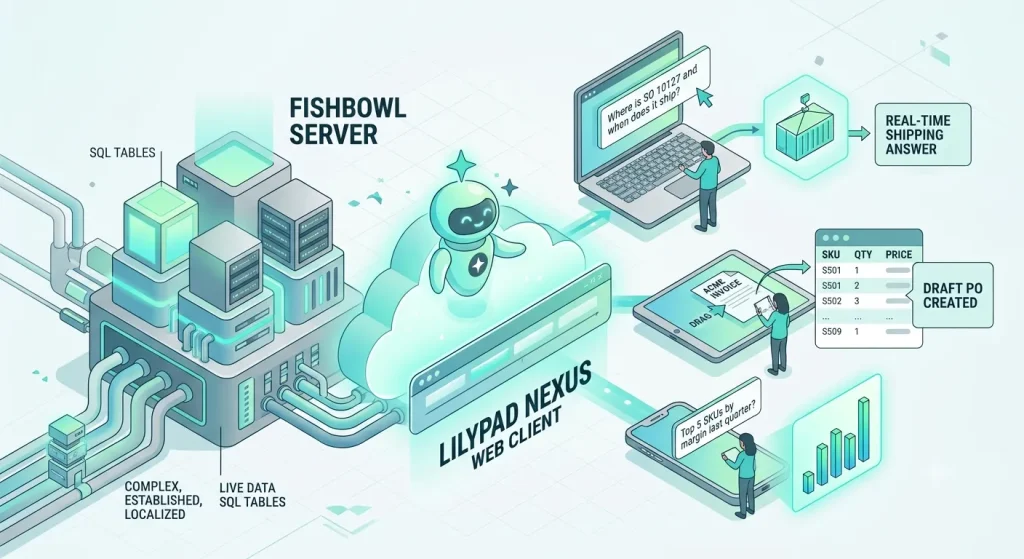
That is the exact philosophy behind Lilypad Nexus, a browser-native web client that untethers your team from their desks and puts the full power of your Fishbowl data directly into their pockets.
Scenario A: The Field Sales Rep’s Parking Lot Prayer
Let’s step out of the corporate office for a moment and look at how location-dependent software impacts your revenue generators: your field sales team.
Imagine one of your top account executives, Sarah, sitting in her car right outside a major client’s headquarters. She’s about to walk into a high-stakes renewal meeting. The client is notoriously demanding and wants to know if you can fulfill an immediate order of 1,200 specialized widgets by next Tuesday.
Without a true mobile web client, Sarah’s pre-meeting routine looks like a frantic tech triage:
- She boots up her laptop on the steering wheel.
- She toggles her phone hotspot and waits for a connection.
- She fires up a slow, laggy corporate VPN.
- She launches a remote desktop application, waiting for the pixelated screen to catch up with her mouse clicks.
- She pinches and zooms on microscopic text boxes designed for a 24-inch monitor, praying the cellular connection doesn’t drop before she can check the multi-location stock levels.
If the tech fails, Sarah is forced to walk into the meeting blind, give a vague estimate (“I think we have those in stock, let me verify when I get back to the office”), or call a warehouse manager, pulling them away from their actual job to look up a screen.
Enter the Nexus Alternative
With Lilypad Nexus, Sarah doesn’t even need to open her laptop. She pulls out her smartphone while walking up the elevator. She opens her standard mobile web browser, logs into a secure, responsive dashboard, and reads the live data.
Because Nexus features a built-in AI assistant powered by Claude, she doesn’t even have to tap through inventory modules. She simply types or dictates: “What is our available on-hand stock for the premium widget across all warehouses?”
Within three seconds, she has a precise, real-time count. She walks into the boardroom with total confidence, quotes an exact number, closes the deal, and can even draft the sales order right there on her tablet before she shakes the client’s hand. That is how software speed translates directly into revenue momentum.

Scenario B: The Great Warehouse Walkathon
Now let’s flip the script and look at the other side of your business: the fulfillment floor.
Your warehouse leads and cycle counters do not work sitting down. They spend their days walking miles on hard concrete, tracking incoming freight, managing pick routes, and keeping a physical eye on your assets.
Yet, when traditional ERP software is locked to a desktop environment, the warehouse floor becomes an arena of wasted steps.
Consider a warehouse supervisor, Mike, who is auditing an aisle and spots a damaged box of high-value components. He needs to adjust the inventory count down by 15 units so the system doesn’t accidentally allocate those broken parts to an upcoming manufacturing order.
Without a mobile web interface, Mike’s workflow looks incredibly inefficient:
- He jots down the part number, the bin location, and the quantity on a scrap piece of paper (or worse, tries to remember it).
- He walks all the way back across the warehouse floor to the shipping desk terminal.
- He waits for the desktop computer to wake up, logs into the system, and clicks through the inventory adjustment module.
- He manually keys in the data, hopes he didn’t misread his own handwriting, and saves it.
This “walkathon” happens dozens of times a day across your entire team. Every trip back to a terminal is an interruption. Every handwritten note is a chance for a typo, a lost slip of paper, or data entry lag that throws off your actual stock accuracy.
Moving the Terminal to the Aisle
Nexus reimagines this entire operational workflow. Because it is an entirely browser-based client, it works natively on any rugged warehouse tablet or mobile scanner.
Mike doesn’t need to leave the aisle. He stands right in front of the pallet, pulls up Nexus on his tablet, and types a simple command to the AI assistant: “Reduce inventory for part BRK-200 in Bin A-4 by 15 units due to box damage.”
Nexus pulls the live table, processes the request, and presents Mike with a clean, pre-filled adjustment draft. He reviews it, taps “Approve,” and the change is written to the live Fishbowl database in real time. He didn’t take a single wasted step, his data is 100% accurate, and the system is updated instantly before anyone else can attempt to pick those parts.
The Mac Compatibility Conundrum: Solved
Let’s address a quiet IT headache that plagues many growing product companies: hardware tribalism. Your creative teams, marketing staff, and executive leadership often prefer operating on Apple hardware. Meanwhile, your traditional desktop ERP software requires a Windows environment.
Historically, solving this meant building a fragile house of cards: running resource-heavy Windows emulators on MacBooks, setting up dedicated virtual machines, or forcing Mac lovers to use a secondary Windows laptop just for inventory tasks. It is expensive to license, tedious to maintain, and frustrating to use.
Nexus eliminates the Apple-vs-Windows debate entirely. It is fundamentally platform-agnostic. Because it lives in the web browser, it runs flawlessly and natively in Safari on a MacBook, Chrome on a PC, or Edge on a tablet.
Your team gets a unified, modern interface regardless of the logo on the back of their machine. Your IT department can finally stop managing remote desktop profiles and focus on higher-value projects.
Speed is Good, but Control is Mandatory
When you give an entire team mobile access to your core business data, security and oversight become your top priorities. Nobody wants a rogue tap on a smartphone screen to accidentally delete a major purchase order or alter a vendor pricing tier.
Nexus gives you the agility of mobile web access without sacrificing an ounce of corporate control. It operates on a strict human-in-the-loop framework combined with two critical guardrails:
1. The Draft Safeguard
The built-in AI assistant never posts directly to your database behind your back. Whether a sales rep asks it to “create a quote” or a buyer asks it to “replenish low stock,” Nexus generates a temporary, fully editable draft first. The data sits in a staging area on the screen until an authorized human operator physically reviews the details and clicks the final confirmation button.
2. Mirror-Image Permissions
Nexus respects the exact security profiles and user restrictions you have already configured within your native Fishbowl environment. If a warehouse employee is restricted from viewing profit margins or financial data on the desktop application, the web client will completely mask that data from them as well. The AI assistant won’t reveal unauthorized data to users through text prompts, either. Your data stays completely locked down.
Upgrade Your Interface, Protect Your Investment
You have invested years of work, thousands of dollars, and immense intellectual energy into building your Fishbowl setup. Your safety stocks, historical records, bill of materials, and vendor structures represent the institutional knowledge of your entire operation. Giving your team a modern mobile tool shouldn’t require you to throw that history away.
Lilypad Nexus lets you keep the engine you trust while completely upgrading the driver’s seat. You get the speed of an AI assistant, the freedom of a native web app, and true cross-device mobility—all without moving a single row of data or enduring a nightmare migration.
The site linked here offers a general overview of online gambling and casino entertainment, including reviews and news related to games and industry trends. It also covers practical topics such as betting strategies and responsible gambling resources that some readers may find helpful. Individuals seeking a topical reference or an external starting point for further reading can consult the resource.
You don’t even have to take our word for how seamlessly it integrates. Lilypad can spin up a secure, identical sandbox duplicate of your Fishbowl database and connect it to Nexus in just a few minutes. This lets your remote sales reps and warehouse leads test drive the mobile interface and run natural-language queries using your actual everyday numbers—completely risk-free.
Ready to untether your team and experience true mobility? Contact the Lilypad team today to set up your live sandbox walkthrough.